React Testing Library
General Info
It’s also important to note that after every test, React Testing Library unmounts the rendered components. That’s why we render for each test. For a lot of tests for a component, the beforeEach jest function could prove handy.
Snapshots
Snapshot testing is just comparing our rendered component with an associated snapshot file. Snapshot tests are fast and easy to write. One assertion saves us from writing multiple lines of code. For example, with a toMatchSnapshot, we’re spared of asserting the existence of the button and the heading. They also don’t let unexpected changes creep into our code.
Snapshots might seem the best thing that has happened to us while testing thus far. But we are forced to wonder, what exactly are we testing? What’s being validated? If a snapshot passes, what does it convey about the correctness of the component?
Snapshot tests may cause false positives. Since we cannot ascertain the validity of the component from a snapshot test, a bug might go undetected. Over-reliance on snapshots can make developers more confident about their code than they should be.
The other issue with snapshots is false negatives. Even the most insignificant of changes compel the test to fail. Fixing punctuation? Snapshot will fail. Replacing an HTML tag to a more semantic one? Snapshot will fail. This might cause us to lose our confidence in the test suite altogether. Snapshots aren’t inherently bad; they do serve a purpose. But it’s beneficial to understand when to snapshot, and when not to snapshot.
Updating Snapshots
You can run Jest with a flag that will tell it to re-generate snapshots:
jest --updateSnapshot
If you'd like to limit which snapshot test cases get re-generated, you can pass an additional --testNamePattern flag to re-record snapshots only for those tests that match the pattern.
Interactive Snapshot Mode
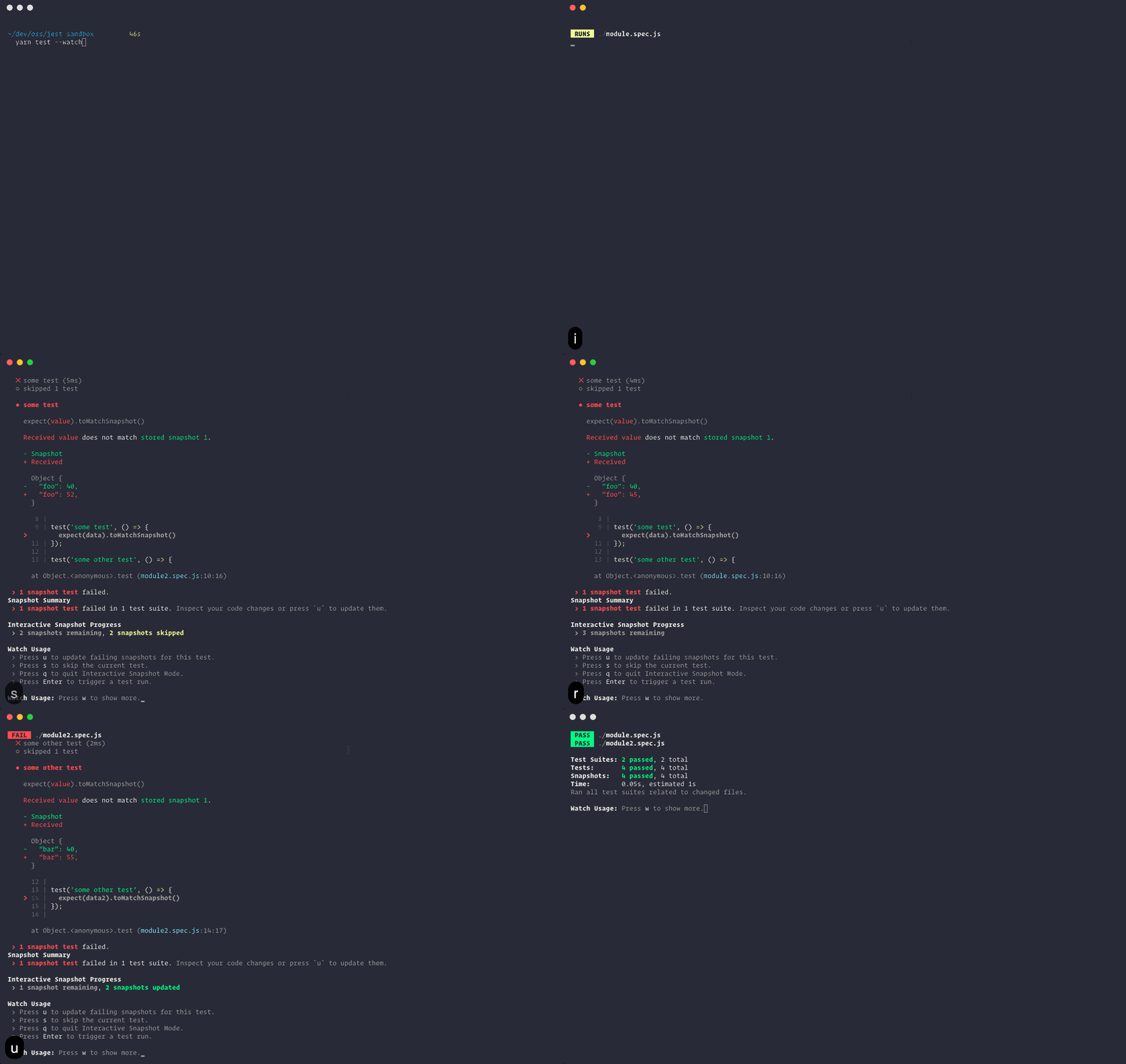
Failed snapshots can also be updated interactively in watch mode:
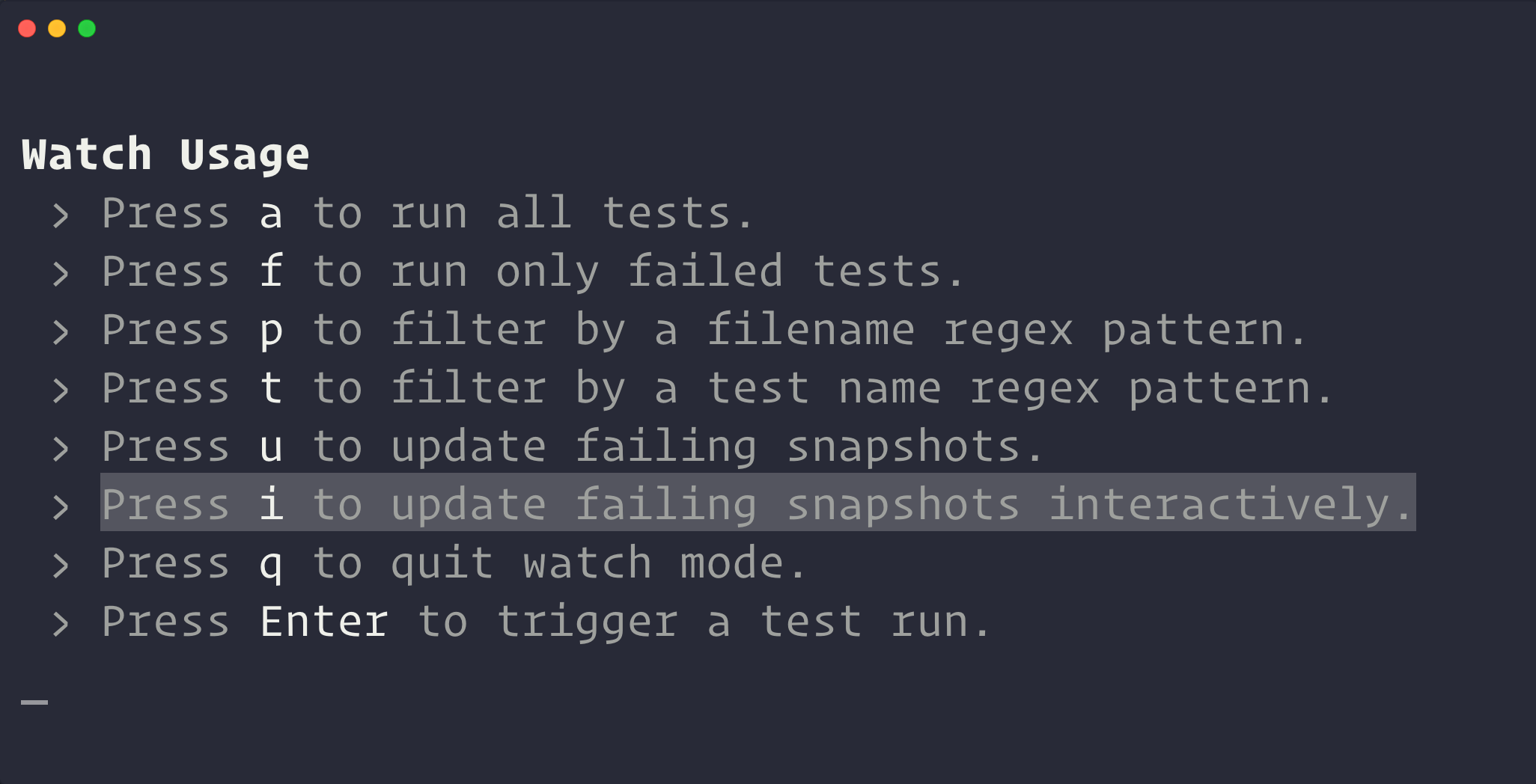
Once you enter Interactive Snapshot Mode, Jest will step you through the failed snapshots one test at a time and give you the opportunity to review the failed output.
Inline Snapshots
Inline snapshots behave identically to external snapshots (.snap files), except the snapshot values are written automatically back into the source code. This means you can get the benefits of automatically generated snapshots without having to switch to an external file to make sure the correct value was written.
The next time you run Jest, tree will be evaluated, and a snapshot will be written as an argument to toMatchInlineSnapshot:
it('renders correctly', () => {
  const tree = renderer
    .create(<Link page="https://example.com">Example Site</Link>)
    .toJSON();
  expect(tree).toMatchInlineSnapshot(`
<a
  className="normal"
  href="https://example.com"
  onMouseEnter={[Function]}
  onMouseLeave={[Function]}
>
  Example Site
</a>
`);
});
Snapshot Best Practices
- Treat snapshots as code
- Commit snapshots and review them as part of your regular code review process. This means treating snapshots as you would any other type of test or code in your project.
- Ensure that your snapshots are readable by keeping them focused, short, and by using tools that enforce these stylistic conventions.
- The goal is to make it easy to review snapshots in pull requests, and fight against the habit of regenerating snapshots when test suites fail instead of examining the root causes of their failure.
- Tests should be deterministic
- Your tests should be deterministic. Running the same tests multiple times on a component that has not changed should produce the same results every time. You're responsible for making sure your generated snapshots do not include platform specific or other non-deterministic data.
- Use descriptive snapshot names
- Always strive to use descriptive test and/or snapshot names for snapshots. The best names describe the expected snapshot content. This makes it easier for reviewers to verify the snapshots during review, and for anyone to know whether or not an outdated snapshot is the correct behavior before updating.
User Event Library
user-eventis a companion library for Testing Library that simulates user interactions by dispatching the events that would happen if the interaction took place in a browser.
Pointer API
The pointer API allows to simulate interactions with pointer devices. It accepts a single pointer action or an array of them. Our primary target audience tests per jest in a jsdom environment and there is no layout in jsdom. This means that different from your browser the elements don't exist in a specific position, layer and size.
We don't try to determine if the pointer action you describe is possible at that position in your layout.
Keyboard API
The keyboard API allows to simulate interactions with a keyboard. It accepts a string describing the key actions.
keyboard('{Shift}{f}{o}{o}') // translates to: Shift, f, o, o
Clipboard API
Note that the Clipboard API is usually not available outside of secure context.
To enable testing of workflows involving the clipboard, userEvent.setup() replaces window.navigator.clipboard with a stub.