Git
General Info
Git is software for tracking changes in any set of files, usually used for coordinating work among programmers collaboratively developing source code during software development. Its goals include speed, data integrity, and support for distributed, non-linear workflows (thousands of parallel branches running on different systems).
Git Branch
A branch is actually a pointer to a single commit! Hearing this, your first thought might be “Well if a branch is just a finger pointing at a single commit, how does that single commit know about all the commits that came before it?” The answer to this question is very simple: Each commit is also a pointer that points to the commit that came before it!
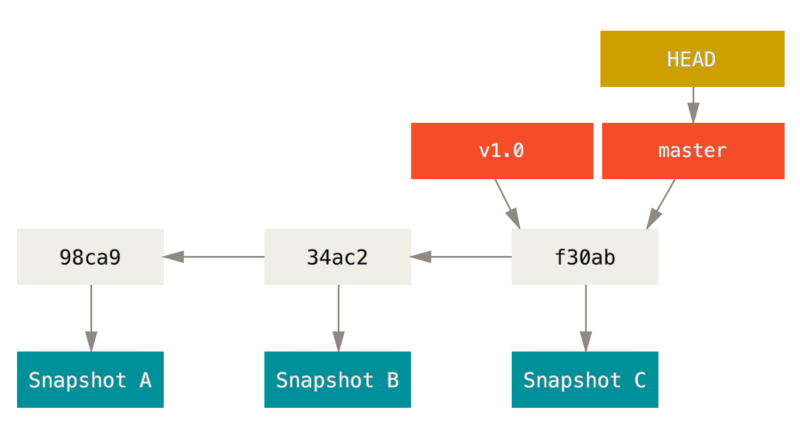
Because a branch in Git is actually a simple file that contains the 40 character SHA-1 checksum of the commit it points to, branches are cheap to create and destroy. Creating a new branch is as quick and simple as writing 41 bytes to a file (40 characters and a newline).
Git Commands
Git Squash (combining commits)
git rebase -i --root
then
pick e30ff48 Create first file
squash 92aa6f3 Create second file
pick 05e5413 Create third file and create fourth file
then
git rebase --continue
Splitting Commits
git rebase -i --root
pick e30ff48 Create first and second file
edit 05e5413 Create third file and create fourth file
git reset HEAD^  # HEAD^ means 1 before the head
git add test3.md && git commit -m 'Create third file'
git add test4.md && git commit -m 'Create fourth file'
git rebase --continue
Git Push Force
This is a very dangerous command, the --force option should be used only when you are certain that it is appropriate.
For git push --force only use it when appropriate, use it with caution, and preferably default to using git push --force-with-lease.
Git Amend
For git amend never amend commits that have been pushed to remote repositories.
Git Rebase
In Git, there are two main ways to integrate changes from one branch into another: the merge and the rebase.
For git rebase never rebase a repository that others may work off of.
Git Reset
For git reset never reset commits that have been pushed to remote repositories.
Git cherry-pick
Takes a commit from somewhere else, and "play it back" wherever you are right now. Because this introduces the same change with a different parent, Git builds a new commit with a different ID.
Git Merge
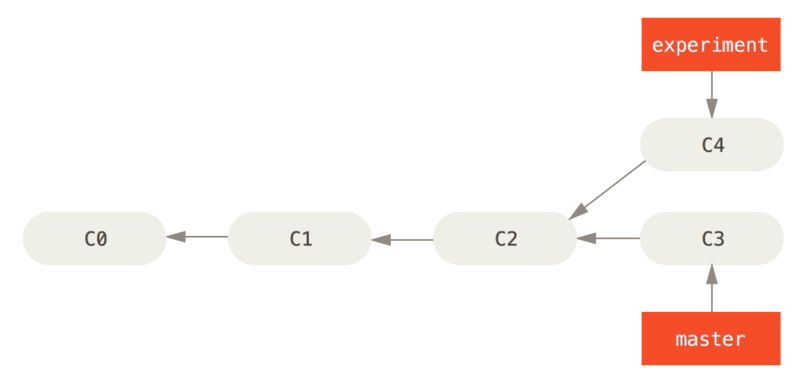
It performs a three-way merge between the two latest branch snapshots (C3 and C4) and the most recent common ancestor of the two (C2), creating a new snapshot (and commit).
Children