Computer Vision
Computer Vision Models and Capabilities
-
Image Classification
-
Object Detection
-
Semantic Segmentation - Semantic segmentation is an advanced machine learning technique in which individual pixels in the image are classified according to the object to which they belong.
-
Image Analysis - You can create solutions that combine machine learning models with advanced image analysis techniques to extract information from images, including "tags" that could help catalog the image or even descriptive captions that summarize the scene shown in the image.
-
Face detection, analysis and recognition
-
Optical Character Recognition - is a technique used to detect and read text in images. You can use OCR to read text in photographs (for example, road signs or store fronts) or to extract information from scanned documents such as letters, invoices, or forms.
Computer vision services in Microsoft Azure
| Service | Capabilities |
|---|---|
| Computer Vision | You can use this service to analyze images and video, and extract descriptions, tags, objects, and text. |
| Custom Vision | Use this service to train custom image classification and object detection models using your own images. |
| Face | The Face service enables you to build face detection and facial recognition solutions. |
| Form Recognizer | Use this service to extract information from scanned forms and invoices. |
Analyzing images with the CV Service
Describing an image
Computer Vision has the ability to analyze an image, evaluate the objects that are detected, and generate a human-readable phrase or sentence that can describe what was detected in the image. Depending on the image contents, the service may return multiple results, or phrases. Each returned phrase will have an associated confidence score, indicating how confident the algorithm is in the supplied description. The highest confidence phrases will be listed first.
To help you understand this concept, consider the following image of the Empire State building in New York. The returned phrases are listed below the image in the order of confidence.
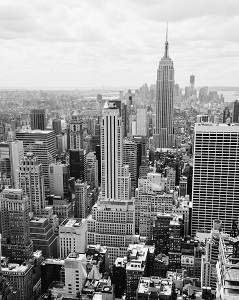
- A black and white photo of a city
- A black and white photo of a large city
- A large white building in a city
Tagging visual features
The image descriptions generated by Computer Vision are based on a set of thousands of recognizable objects, which can be used to suggest tags for the image. These tags can be associated with the image as metadata that summarizes attributes of the image; and can be particularly useful if you want to index an image along with a set of key terms that might be used to search for images with specific attributes or contents.
For example, the tags returned for the Empire State building image include:
- skyscraper
- tower
- building
Detecting objects
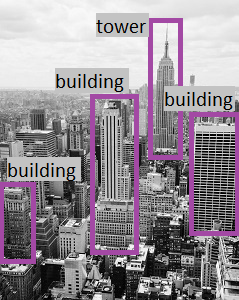
The object detection capability is similar to tagging, in that the service can identify common objects; but rather than tagging, or providing tags for the recognized objects only, this service can also return what is known as bounding box coordinates. Not only will you get the type of object, but you will also receive a set of coordinates that indicate the top, left, width, and height of the object detected, which you can use to identify the location of the object in the image, like this:
Detecting brands
This feature provides the ability to identify commercial brands. The service has an existing database of thousands of globally recognized logos from commercial brands of products.
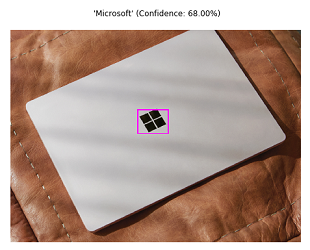
When you call the service and pass it an image, it performs a detection task and determine if any of the identified objects in the image are recognized brands. The service compares the brands against its database of popular brands spanning clothing, consumer electronics, and many more categories. If a known brand is detected, the service returns a response that contains the brand name, a confidence score (from 0 to 1 indicating how positive the identification is), and a bounding box (coordinates) for where in the image the detected brand was found.
For example, in the following image, a laptop has a Microsoft logo on its lid, which is identified and located by the Computer Vision service.
Detecting faces
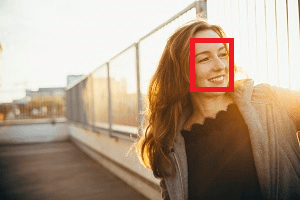
The Computer Vision service can detect and analyze human faces in an image, including the ability to determine age and a bounding box rectangle for the location of the face(s). The facial analysis capabilities of the Computer Vision service are a subset of those provided by the dedicated Face Service. If you need basic face detection and analysis, combined with general image analysis capabilities, you can use the Computer Vision service; but for more comprehensive facial analysis and facial recognition functionality, use the Face service.
The following example shows an image of a person with their face detected and approximate age estimated.
Categorizing an image
Computer Vision can categorize images based on their contents. The service uses a parent/child hierarchy with a "current" limited set of categories. When analyzing an image, detected objects are compared to the existing categories to determine the best way to provide the categorization. As an example, one of the parent categories is people_. This image of a person on a roof is assigned a category of people_.
Computer Vision 86 Catergory Taxonomy
Detecting domain-specific content
When categorizing an image, the Computer Vision service supports two specialized domain models:
- Celebrities - The service includes a model that has been trained to identify thousands of well-known celebrities from the worlds of sports, entertainment, and business.
- Landmarks - The service can identify famous landmarks, such as the Taj Mahal and the Statue of Liberty.
For example, when analyzing the following image for landmarks, the Computer Vision service identifies the Eiffel Tower, with a confidence of 99.41%.
Optical character recognition
The Computer Vision service can use optical character recognition (OCR) capabilities to detect printed and handwritten text in images. This capability is explored in the Read text with the Computer Vision service module on Microsoft Learn.
Additional capabilities
In addition to these capabilities, the Computer Vision service can:
- Detect image types - for example, identifying clip art images or line drawings.
- Detect image color schemes - specifically, identifying the dominant foreground, background, and overall colors in an image.
- Generate thumbnails - creating small versions of images.
- Moderate content - detecting images that contain adult content or depict violent, gory scenes.
Classifying Images with CV
Image classification is a machine learning technique in which the object being classified is an image, such as a photograph.
To create an image classification model, you need data that consists of features and their labels. The existing data is a set of categorized images. Digital images are made up of an array of pixel values, and these are used as features to train the model based on the known image classes.
You can use a machine learning classification technique to predict which category, or class, something belongs to. Classification machine learning models use a set of inputs, which we call features, to calculate a probability score for each possible class and predict a label that indicates the most likely class that an object belongs to.
The model is trained to match the patterns in the pixel values to a set of class labels. After the model has been trained, you can use it with new sets of features to predict unknown label values.
Most modern image classification solutions are based on deep learning techniques that make use of convolutional neural networks (CNNs) to uncover patterns in the pixels that correspond to particular classes. Training an effective CNN is a complex task that requires considerable expertise in data science and machine learning.
Model Evaluation
Model training process is an iterative process in which the Custom Vision service repeatedly trains the model using some of the data, but holds some back to evaluate the model. At the end of the training process, the performance for the trained model is indicated by the following evaluation metrics:
- Precision: What percentage of the class predictions made by the model were correct? For example, if the model predicted that 10 images are oranges, of which eight were actually oranges, then the precision is 0.8 (80%).
- Recall: What percentage of class predictions did the model correctly identify? For example, if there are 10 images of apples, and the model found 7 of them, then the recall is 0.7 (70%).
- Average Precision (AP): An overall metric that takes into account both precision and recall).
Object Detection
Object detection is a form of machine learning based computer vision in which a model is trained to recognize individual types of objects in an image, and to identify their location in the image.
Object detection vs. image classification
Image classification is a machine learning based form of computer vision in which a model is trained to categorize images based on the primary subject matter they contain. Object detection goes further than this to classify individual objects within the image, and to return the coordinates of a bounding box that indicates the object's location.
Image Tagging
Before you can train an object detection model, you must tag the classes and bounding box coordinates in a set of training images.
Model training and evaluation
- Precision: What percentage of class predictions did the model correctly identify? For example, if the model predicted that 10 images are oranges, of which eight were actually oranges, then the precision is 0.8 (80%).
- Recall: What percentage of the class predictions made by the model were correct? For example, if there are 10 images of apples, and the model found 7 of them, then the recall is 0.7 (70%).
- Mean Average Precision (mAP): An overall metric that takes into account both precision and recall across all classes).
Face Detection
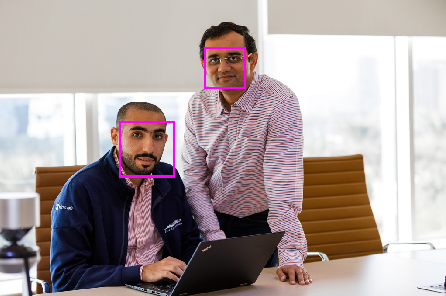
Face detection involves identifying regions of an image that contain a human face, typically by returning bounding box coordinates that form a rectangle around the face, like this:
Facial Analysis
Moving beyond simple face detection, some algorithms can also return other information, such as facial landmarks (nose, eyes, eyebrows, lips, and others).
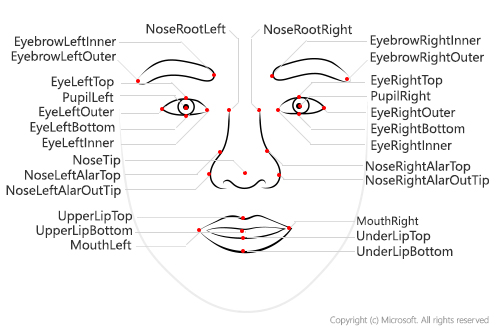
hese facial landmarks can be used as features with which to train a machine learning model from which you can infer information about a person, such as their perceived age or perceived emotional state.
Facial recognition
A further application of facial analysis is to train a machine learning model to identify known individuals from their facial features. This usage is more generally known as facial recognition, and involves using multiple images of each person you want to recognize to train a model so that it can detect those individuals in new images on which it wasn't trained.
Use Cases for Face Detection and Analysis
- Security - facial recognition can be used in building security applications, and increasingly it is used in smart phones operating systems for unlocking devices.
- Social media - facial recognition can be used to automatically tag known friends in photographs.
- Intelligent monitoring - for example, an automobile might include a system that monitors the driver's face to determine if the driver is looking at the road, looking at a mobile device, or shows signs of tiredness.
- Advertising - analyzing faces in an image can help direct advertisements to an appropriate demographic audience.
- Missing persons - using public cameras systems, facial recognition can be used to identify if a missing person is in the image frame.
- Identity validation - useful at ports of entry kiosks where a person holds a special entry permit.
Text Detection
Optical Character Recognition (OCR)
The basic foundation of processing printed text is optical character recognition (OCR), in which a model can be trained to recognize individual shapes as letters, numerals, punctuation, or other elements of text. Much of the early work on implementing this kind of capability was performed by postal services to support automatic sorting of mail based on postal codes. Since then, the state-of-the-art for reading text has moved on, and it's now possible to build models that can detect printed or handwritten text in an image and read it line-by-line or even word-by-word.
Machine Reading Comprehension (MRC)
At the other end of the scale, there is machine reading comprehension (MRC), in which an AI system not only reads the text characters, but can use a semantic model to interpret what the text is about.