CORS
General Info
Cross Origin Resource Sharing is a mechanism that allows restricted resources on a web page to be requested from another domain outside the domain from which the first resource was served.
fetch('url.url.com/api', {
  mode: 'cors'
});
Simply adding the {mode: 'cors'} after the URL, as shown above, will solve our problems for now. In the future, however, you may want to look further into the implications of this restriction.
From Javascript.info
Cross-origin requests – those sent to another domain (even a subdomain) or protocol or port – require special headers from the remote side.
Safe requests
There are two types of cross-origin requests:
- Safe requests.
- All the others.
Safe Requests are simpler to make, so let’s start with them.
A request is safe if it satisfies two conditions:
- Safe method: GET, POST or HEAD
- Safe headers – the only allowed custom headers are:
Accept,Accept-Language,Content-Language,Content-Typewith the value:application/x-www-form-urlencodedORmultipart/form-dataORtext/plain
Any other request is considered “unsafe”. For instance, a request with PUT method or with an API-Key HTTP-header does not fit the limitations.
The essential difference is that a safe request can be made with a <form> or a <script>, without any special methods.
So, even a very old server should be ready to accept a safe request.
Contrary to that, requests with non-standard headers or e.g. method DELETE can’t be created this way. For a long time JavaScript was unable to do such requests. So an old server may assume that such requests come from a privileged source, “because a webpage is unable to send them”.
When we try to make a unsafe request, the browser sends a special “preflight” request that asks the server – does it agree to accept such cross-origin requests, or not?
And, unless the server explicitly confirms that with headers, an unsafe request is not sent.
CORS for safe requests
If a request is cross-origin, the browser always adds the Origin header to it.
GET /request
Host: anywhere.com
Origin: https://javascript.info
As you can see, the Origin header contains exactly the origin (domain/protocol/port), without a path.
The server can inspect the Origin and, if it agrees to accept such a request, add a special header Access-Control-Allow-Origin to the response. That header should contain the allowed origin (in our case https://javascript.info), or a star *. Then the response is successful, otherwise it’s an error.
The browser plays the role of a trusted mediator here:
- It ensures that the correct
Originis sent with a cross-origin request. - It checks for permitting
Access-Control-Allow-Originin the response, if it exists, then JavaScript is allowed to access the response, otherwise it fails with an error.
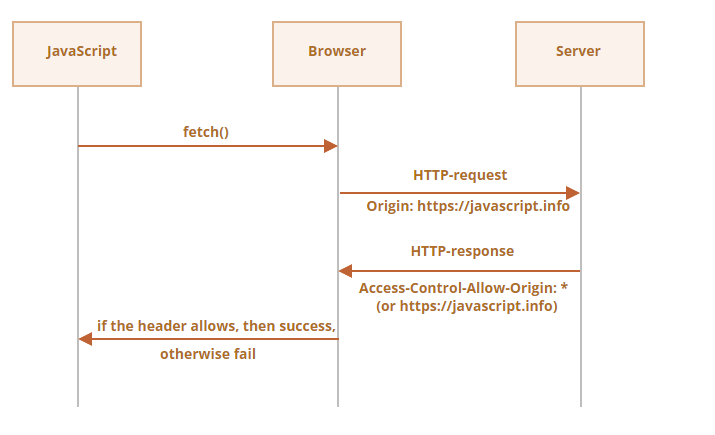
Here’s an example of a permissive server response:
200 OK
Content-Type:text/html; charset=UTF-8
Access-Control-Allow-Origin: https://javascript.info
Response headers
For cross-origin request, by default JavaScript may only access so-called “safe” response headers:
Cache-ControlContent-LanguageContent-TypeExpiresLast-ModifiedPragma
Accessing any other response header causes an error.
There’s no Content-Length header in the list!
This header contains the full response length. So, if we’re downloading something and would like to track the percentage of progress, then an additional permission is required to access that header (see below).
To grant JavaScript access to any other response header, the server must send the Access-Control-Expose-Headers header. It contains a comma-separated list of unsafe header names that should be made accessible.
For example:
200 OK
Content-Type:text/html; charset=UTF-8
Content-Length: 12345
API-Key: 2c9de507f2c54aa1
Access-Control-Allow-Origin: https://javascript.info
Access-Control-Expose-Headers: Content-Length,API-Key
With such an Access-Control-Expose-Headers header, the script is allowed to read the Content-Length and API-Key headers of the response.
"Unsafe" Requests
We can use any HTTP-method: not just GET/POST, but also PATCH, DELETE and others.
Some time ago no one could even imagine that a webpage could make such requests. So there may still exist webservices that treat a non-standard method as a signal: “That’s not a browser”. They can take it into account when checking access rights.
So, to avoid misunderstandings, any “unsafe” request – that couldn’t be done in the old times, the browser does not make such requests right away. First, it sends a preliminary, so-called “preflight” request, to ask for permission.
A preflight request uses the method OPTIONS, no body and three headers:
Access-Control-Request-Methodheader has the method of the unsafe request.Access-Control-Request-Headersheader provides a comma-separated list of its unsafe HTTP-headers.Originheader tells from where the request came. (such as )
If the server agrees to serve the requests, then it should respond with empty body, status 200 and headers:
Access-Control-Allow-Originmust be either*or the requesting origin, such as , to allow it.Access-Control-Allow-Methodsmust have the allowed method.Access-Control-Allow-Headersmust have a list of allowed headers.- Additionally, the header Access-Control-Max-Age may specify a number of seconds to cache the permissions. So the browser won’t have to send a preflight for subsequent requests that satisfy given permissions.
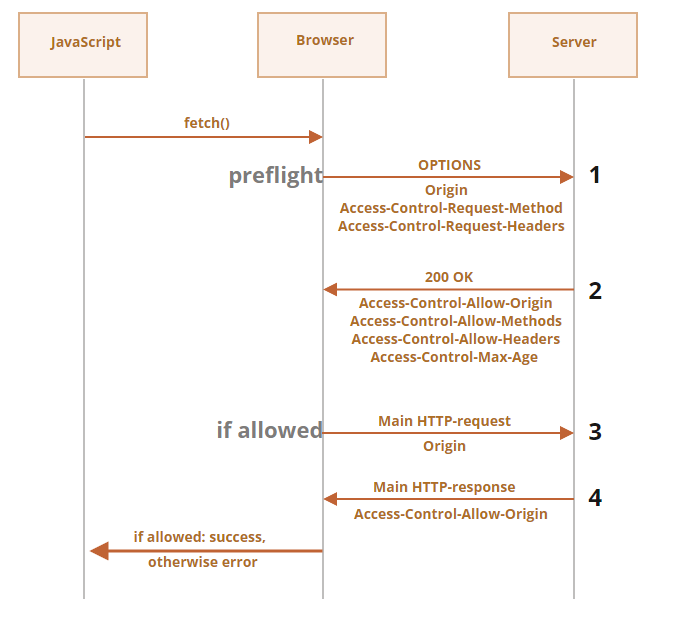
Let’s see how it works step-by-step on the example of a cross-origin PATCH request (this method is often used to update data):
let response = await fetch('https://site.com/service.json', {
  method: 'PATCH',
  headers: {
    'Content-Type': 'application/json',
    'API-Key': 'secret'
  }
});
There are three reasons why the request is unsafe (one is enough):
- Method
PATCH Content-Typeis not one of:application/x-www-form-urlencoded,multipart/form-data,text/plain.- “Unsafe”
API-Keyheader.
Step 1 (preflight request)
Prior to sending such a request, the browser, on its own, sends a preflight request that looks like this:
OPTIONS /service.json
Host: site.com
Origin: https://javascript.info
Access-Control-Request-Method: PATCH
Access-Control-Request-Headers: Content-Type,API-Key
- Method:
OPTIONS. - The path – exactly the same as the main request:
/service.json. - Cross-origin special headers:
Origin– the source origin.Access-Control-Request-Method– requested method.Access-Control-Request-Headers` – a comma-separated list of “unsafe” headers.
Step 2 (preflight response)
The server should respond with status 200 and the headers:
Access-Control-Allow-Origin: https://javascript.infoAccess-Control-Allow-Methods: PATCHAccess-Control-Allow-Headers: Content-Type,API-Key.
That allows future communication, otherwise an error is triggered.
If the server expects other methods and headers in the future, it makes sense to allow them in advance by adding them to the list.
For example, this response also allows PUT, DELETE and additional headers:
200 OK
Access-Control-Allow-Origin: https://javascript.info
Access-Control-Allow-Methods: PUT,PATCH,DELETE
Access-Control-Allow-Headers: API-Key,Content-Type,If-Modified-Since,Cache-Control
Access-Control-Max-Age: 86400
Now the browser can see that PATCH is in Access-Control-Allow-Methods and Content-Type,API-Key are in the list Access-Control-Allow-Headers, so it sends out the main request.
If there’s the header Access-Control-Max-Age with a number of seconds, then the preflight permissions are cached for the given time. The response above will be cached for 86400 seconds (one day). Within this timeframe, subsequent requests will not cause a preflight. Assuming that they fit the cached allowances, they will be sent directly.
Step 3 (actual request)
When the preflight is successful, the browser now makes the main request. The process here is the same as for safe requests.
The main request has the Origin header (because it’s cross-origin):
PATCH /service.json
Host: site.com
Content-Type: application/json
API-Key: secret
Origin: https://javascript.info
Step 4 (actual response)
The server should not forget to add Access-Control-Allow-Origin to the main response. A successful preflight does not relieve from that:
Access-Control-Allow-Origin: https://javascript.info
Then JavaScript is able to read the main server response.
Please note:
Preflight request occurs “behind the scenes”, it’s invisible to JavaScript.
JavaScript only gets the response to the main request or an error if there’s no server permission.
Credentials
A cross-origin request initiated by JavaScript code by default does not bring any credentials (cookies or HTTP authentication).
That’s uncommon for HTTP-requests. Usually, a request to http://site.com is accompanied by all cookies from that domain. Cross-origin requests made by JavaScript methods on the other hand are an exception.
For example, fetch('http://another.com') does not send any cookies, even those (!) that belong to another.com domain.
Why?
That’s because a request with credentials is much more powerful than without them. If allowed, it grants JavaScript the full power to act on behalf of the user and access sensitive information using their credentials.
Does the server really trust the script that much? Then it must explicitly allow requests with credentials with an additional header.
To send credentials in fetch, we need to add the option credentials: "include", like this:
fetch('http://another.com', {
  credentials: "include"
});
Now fetch sends cookies originating from another.com with request to that site.
If the server agrees to accept the request with credentials, it should add a header Access-Control-Allow-Credentials: true to the response, in addition to Access-Control-Allow-Origin.
For example:
200 OK
Access-Control-Allow-Origin: https://javascript.info
Access-Control-Allow-Credentials: true
Please note: Access-Control-Allow-Origin is prohibited from using a star * for requests with credentials. Like shown above, it must provide the exact origin there. That’s an additional safety measure, to ensure that the server really knows who it trusts to make such requests.
Why do we need Origin?
As you probably know, there’s HTTP-header Referer, that usually contains an url of the page which initiated a network request.
For instance, when fetching from , the headers look like this:
Accept: */*
Accept-Charset: utf-8
Accept-Encoding: gzip,deflate,sdch
Connection: keep-alive
Host: google.com
Origin: http://javascript.info
Referer: http://javascript.info/some/url
As you can see, both Referer and Origin are present.
The questions:
Why Origin is needed, if Referer has even more information?
Is it possible that there’s no Referer or Origin, or is it incorrect?
-
We need
Origin, because sometimesRefereris absent. For instance, when we fetch HTTP-page fromHTTPS(access less secure from more secure), then there’s noReferer. -
The Content Security Policy (CSP) may forbid sending a Referer.
-
As we’ll see, fetch has options that prevent sending the Referer and even allow to change it (within the same site).
-
By specification,
Refereris an optional HTTP-header. -
Exactly because
Refereris unreliable,Originwas invented. The browser guarantees correctOriginfor cross-origin requests.